Mar 7, 2026 · 20 min read
Best Ways to Connect Shopify to BigQuery: Native Connector vs ETL Tools vs Custom Pipeline (2026)
If you run on Shopify and want better reporting, sooner or later you hit the same wall: store reports are useful, but they are not enough for deeper analysis.
You may want to join Shopify orders with ad spend, compare first-time buyers with repeat customers, build product-level profit views, or track performance across tools in one place. That is where BigQuery becomes useful. It gives you a scalable place to store Shopify data, model it, and query it with SQL.
The good news is that getting Shopify data into BigQuery is now easier than it used to be. You have three practical options:
- Use the native Shopify connector in BigQuery Data Transfer Service.
- Build your own pipeline with Shopify APIs and Google Cloud.
- Use a third-party ETL tool.
This guide walks through all three.
It is written for operators, analysts, and engineers who want a clear answer to one question: what is the best way to connect Shopify to BigQuery for my team?
What is Shopify to BigQuery?
Shopify to BigQuery means moving your Shopify store data into Google BigQuery so you can analyze it outside Shopify.
Instead of staying inside store-native reports, you can work with raw or modeled data such as:
- orders
- customers
- products
- variants
- transactions
- refunds
- fulfillments
- inventory
Once the data is in BigQuery, you can:
- run custom SQL
- join Shopify with Google Ads, Meta Ads, GA4, HubSpot, or spreadsheets
- build dashboards in BI tools
- create modeled views for finance, retention, merchandising, and marketing
- schedule recurring reports and alerts
For a broader foundation, see our guide to ecommerce analytics.
Why export Shopify data to BigQuery?
Shopify gives you useful dashboards for running the store day to day. But as your reporting gets more complex, you usually need more control than the Shopify interface gives you.
Here are the most common reasons teams export Shopify data to BigQuery.
1. You want to combine Shopify with other data sources
A lot of important ecommerce questions span more than one tool.
Examples:
- Which ad channel drives the highest repeat purchase rate?
- Which campaigns bring customers with the highest 90-day revenue?
- Which product categories sell well but have weak margins after discounts and refunds?
- Which landing pages drive revenue, not just traffic?
Those questions usually need data from Shopify plus one or more of the following:
- Google Ads
- Meta Ads
- GA4 (Google Analytics)
- Google Search Console
- HubSpot
- spreadsheets or CSV exports
2. You need custom metrics
Store-native reports often stop at surface-level numbers. BigQuery lets you build the exact metric definitions your business needs.
Examples:
- net revenue after discounts and refunds
- contribution margin
- new vs returning customer revenue
- repeat purchase rate
- product-level sell-through
- cohort retention
- blended ROAS
For related metric design ideas, read ecommerce analytics and customer behavior analysis.
3. You want a cleaner analytics stack
Exporting CSVs works at first. Then it becomes fragile.
You end up with version issues, manual copy-paste work, broken formulas, and debates over which sheet is correct. BigQuery helps centralize the data so everyone works from the same base tables.
4. You need better performance at larger volumes
As order history grows, spreadsheet workflows and manual exports get slower and harder to trust. BigQuery is built for larger data volumes and recurring analysis.
Does Shopify have a native BigQuery connector?
Yes. BigQuery Data Transfer Service now includes a native Shopify connector.
Today, you can create a Shopify transfer directly in BigQuery, choose Shopify objects to sync, set a schedule, and run backfills when needed.
That said, the native connector is not automatically the best option for every team. You still need to think about:
- how you will model the raw data
- whether you need near-real-time updates
- whether your team wants to maintain warehouse logic
- whether you need data from several tools, not just Shopify
So the real decision is not just can I connect Shopify to BigQuery?
It is which setup gives my team the right balance of speed, control, and maintenance?
Before you start
No matter which route you choose, decide these basics first.
What questions do you need to answer?
Start with the output, not the pipeline.
For example:
- daily net sales trend
- top products by revenue
- repeat customer rate by month
- refund rate by product category
- ad spend vs Shopify revenue by channel
This helps you know which Shopify objects and other data sources you actually need.
Which refresh speed do you need?
Be honest here.
Many teams do not need true real-time syncing. Hourly or scheduled updates are enough for daily and weekly reviews. If that is your case, the native BigQuery connector or a standard ETL tool may be enough.
If you need event-driven updates immediately after orders, refunds, or product changes, a custom webhook-based pipeline becomes more relevant.
Do you want raw data only, or usable analytics tables?
This is where many teams underestimate the work.
Getting raw Shopify objects into BigQuery is only the first step. You still need to clean field names, flatten nested structures, define revenue logic, and create analyst-friendly tables.
Option 1: Use the native Shopify connector in BigQuery
For many teams, this is the best starting point.
It is the simplest direct route from Shopify into BigQuery without building your own ingestion service.
At the time of writing, Google lists the Shopify connector in BigQuery Data Transfer Service as a Preview feature, so it is worth checking the current status and pricing before you commit to it for production planning.
When the native connector makes sense
Use the native BigQuery route when:
- you already use Google Cloud
- you want a direct path into BigQuery
- scheduled syncs are enough
- your team is comfortable doing SQL and modeling after the data lands
What you need
Before setup, make sure you have:
- a Google Cloud project
- BigQuery enabled
- BigQuery Data Transfer Service enabled
- a target BigQuery dataset
- the right IAM permissions in Google Cloud
- a Shopify store
- a custom Shopify app with the scopes you need
In practice, the setup usually involves one person with Shopify admin access and one person with Google Cloud permissions.
Step-by-step setup
Step 1: Create a custom Shopify app
Create a custom app for your store in Shopify and request the read scopes required for the objects you want to transfer.
Typical examples include scopes related to:
- orders
- products
- customers
- inventory
- discounts
- fulfillments
Keep the scope list tight. Only request what you actually need.
Step 2: Prepare BigQuery
In Google Cloud:
- enable BigQuery
- enable BigQuery Data Transfer Service
- create a dataset for Shopify data
- confirm the user creating the transfer has the required permissions
A simple naming pattern such as shopify_raw works well for the landing dataset.
Step 3: Create the transfer in BigQuery
In the BigQuery console:
- Open Data transfers.
- Click Create transfer.
- Choose Shopify as the source.
- Enter your shop name.
- Add your Shopify app credentials or access token details.
- Choose the Shopify objects to transfer.
- Select the destination dataset.
- Name the transfer.
- Set the schedule.
- Save and run the first transfer.
You can also configure notifications and run a backfill outside the regular schedule.
Which Shopify objects should you start with?
For most stores, start with the core objects that answer the biggest reporting questions first:
- Orders
- Customers
- Products
- Variants
- Order transactions
- Fulfillments
- Refund-related objects if relevant
- Inventory items if stock analysis matters
Do not select every object just because you can. Start with the few that match real reporting use cases.
Pros of the native connector
- fastest direct path into BigQuery
- less engineering work than a custom pipeline
- native scheduling inside Google Cloud
- backfill support
- good fit for raw warehouse ingestion
Limits of the native connector
- it is still a data ingestion step, not a finished analytics model
- you still need to define clean reporting tables
- it may not match every near-real-time use case
- it does not replace cross-source modeling on its own
Best practice for the native route
Do not query raw transfer tables directly for every business question.
Instead, land the raw data in a raw or staging dataset, then build cleaned views or modeled tables such as:
analytics.shopify_ordersanalytics.shopify_order_linesanalytics.shopify_customersanalytics.shopify_refunds
That makes downstream SQL much easier to read and trust.
Option 2: Build a manual Shopify to BigQuery pipeline
This gives you the most control, but also the most responsibility.
A manual pipeline usually combines three parts:
- a historical backfill from the Shopify Admin API
- incremental updates through webhooks
- processing and loading in Google Cloud
A common architecture
A practical manual setup looks like this:
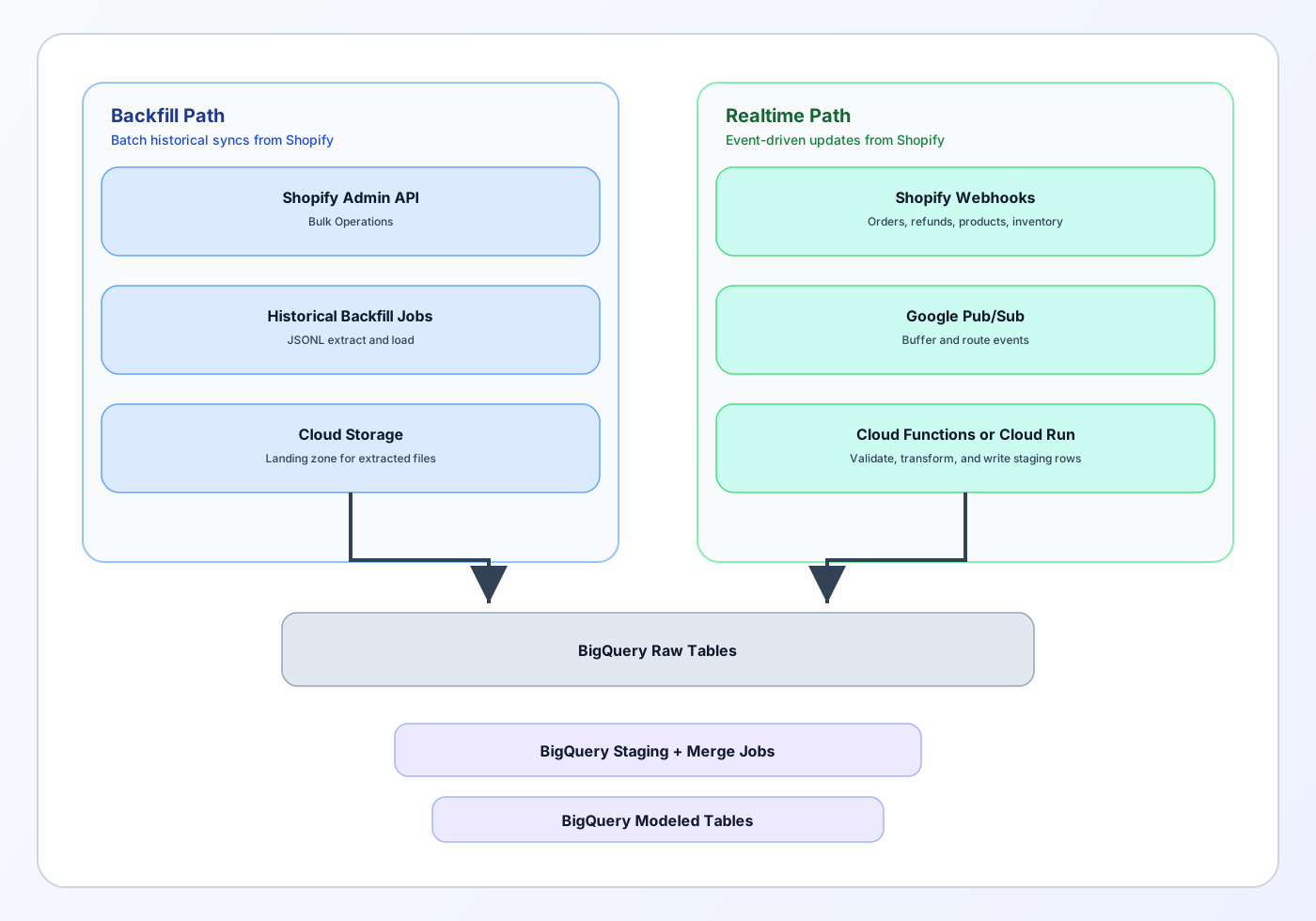
How the manual setup usually works
Step 1: Backfill historical data
For a first full sync, you usually do not want to page through the API one small request at a time. For larger stores, bulk extraction is much more practical.
A common approach is:
- use Shopify bulk operations for large historical extracts
- process the JSONL results in a batch job or land them in storage first
- load the data into raw BigQuery tables
Step 2: Subscribe to webhooks
Use Shopify webhooks for changes such as:
- order creation or update
- product update
- refund or fulfillment events
- inventory changes
Webhooks reduce the need for constant polling and help keep the warehouse fresher between full syncs.
Step 3: Buffer and process events
Pub/Sub is useful here because it decouples Shopify events from your processing code.
Your Cloud Function or Cloud Run service can:
- validate the webhook
- transform the payload
- write it to a staging table
- trigger merge logic into final raw tables
Step 4: Add scheduled repair jobs
Even webhook pipelines drift over time.
Have a scheduled job that re-checks recent records, especially for objects that can change after creation, such as orders, refunds, returns, or fulfillments.
When a manual pipeline is worth it
Choose manual when:
- you need tight control over the schema
- you need custom preprocessing before load
- you need event-driven updates
- you already have engineering capacity
- Shopify is part of a larger platform you are building in Google Cloud
Where manual pipelines get hard
This is the part many lightweight blog posts skip.
The hard work is not making one API call. The hard work is keeping the pipeline correct over time.
Common pain points:
- managing scopes and tokens securely
- handling nested and evolving Shopify objects
- working around API limits
- replaying failed jobs
- deduplicating events
- handling late-arriving updates
- keeping business logic consistent across orders, discounts, taxes, shipping, and refunds
If you go manual, plan for operations and monitoring from day one.
Option 3: Use a third-party ETL tool
A third-party ETL tool is often the fastest way to get a dependable Shopify to BigQuery pipeline without owning the ingestion layer yourself.
When ETL tools make sense
Choose an ETL tool when:
- you want to set up the sync quickly
- you do not want to maintain webhooks and cloud functions
- you need monitoring and retries out of the box
- you also plan to connect other tools besides Shopify
What ETL tools usually handle well
Most solid ETL products help with:
- authentication
- extraction schedules
- retries and sync history
- schema replication
- basic transformations
- connector maintenance over time
Popular ETL tools for Shopify to BigQuery
Here are the most commonly used ETL tools for Shopify data pipelines, with honest trade-offs.
Fivetran
What it is: A managed ETL platform with 400+ pre-built connectors, including Shopify. Known for reliability and ease of setup.
Strengths:
- Very simple setup - connect Shopify and BigQuery in minutes
- Automatic schema drift handling (if Shopify adds fields, Fivetran adapts)
- Strong monitoring and alerting
- Good for teams that want to set it and forget it
Weaknesses:
- Pricing scales with rows synced (can get expensive at high volume)
- Less control over transformation logic
- Raw data lands in Fivetran-specific schema that you'll need to model
Best for: Teams that want the fastest, most reliable path and don't mind the cost.
Airbyte
What it is: Open-source ETL platform with 300+ connectors. Can be self-hosted or used as a managed cloud service.
Strengths:
- Open source (free to self-host)
- Active community and frequent connector updates
- More control than Fivetran if you self-host
- Transparent about how connectors work
Weaknesses:
- Self-hosted version requires engineering time to maintain
- Cloud version pricing is competitive but feature set is newer than Fivetran
- Transformations are basic (you'll likely do most modeling in dbt or SQL)
Best for: Teams with engineering capacity who want control, or teams on a budget willing to self-host.
Stitch (by Talend)
What it is: A managed ETL service owned by Talend, focused on simplicity.
Strengths:
- Simple setup and UI
- Transparent pricing based on rows replicated
- Good integration with Talend's broader data platform if you use it
Weaknesses:
- Smaller connector catalog than Fivetran or Airbyte
- Less active development than competitors
- Transformation options are limited
Best for: Teams already using Talend, or those wanting a simple, no-frills ETL tool.
Comparison table
| Tool | Setup Time | Pricing | Connector Maintenance | Best For |
|---|---|---|---|---|
| Fivetran | 10-15 minutes | $$$ (row-based) | Vendor handles | "Set it and forget it" |
| Airbyte (Cloud) | 15-20 minutes | $$ (row-based) | Vendor handles | Cost-conscious teams |
| Airbyte (Self-hosted) | 1-2 hours | Free (+ infra costs) | You handle | Engineering-heavy teams |
| Stitch | 10-15 minutes | $$ (row-based) | Vendor handles | Simple setups |
| Native BigQuery | 20-30 minutes | $ (included in BigQuery) | Google handles | Google Cloud users |
The trade-offs
The trade-offs with ETL tools are usually:
- recurring software cost
- less control over the exact ingestion logic
- raw mirrored tables that still need modeling
- dependence on the vendor's connector behavior and update cycle
For lean teams, that trade-off is often worth it.
Native vs manual vs ETL: which should you choose?
Here is the practical decision rule.
Choose the native BigQuery connector if:
- BigQuery is already your main warehouse
- you want the shortest direct setup
- scheduled syncs are enough
- your team can do SQL modeling afterward
Choose a manual pipeline if:
- you need custom control at every step
- you need event-driven processing
- you need non-standard transformation logic before load
- you have engineering time to own the pipeline
Choose an ETL tool if:
- you want a faster no-code or low-code setup
- reliability matters more than custom engineering
- you need to connect multiple business tools, not just Shopify
For most teams starting today, the best order is:
- start with the native BigQuery connector if it fits your needs
- move to ETL if you want less maintenance or more connectors
- build manual only when the other two options clearly fall short
Which Shopify data should you analyze first in BigQuery?
Do not try to model everything on day one.
Start with the tables that answer high-value questions quickly.
Orders
Use for:
- revenue trends
- order counts
- average order value
- discount impact
- refund impact
Customers
Use for:
- first vs repeat buyers
- cohort analysis
- customer lifetime value
- retention and frequency
Products and variants
Use for:
- top sellers
- product mix changes
- variant performance
- inventory planning
Transactions and refunds
Use for:
- payment analysis
- net revenue logic
- return and refund reporting
Fulfillments and inventory
Use for:
- fulfillment performance
- stockouts
- inventory turnover
That foundation is enough for a strong first analytics layer.
SQL queries to run once Shopify data is in BigQuery
These examples assume you have created cleaned analytics tables instead of querying raw nested transfer tables directly.
You can adapt the table names to your setup.
1. Daily net revenue, orders, and AOV
This is often the first query teams need.
SELECT
DATE(order_created_at) AS order_date,
COUNT(DISTINCT order_id) AS orders,
ROUND(SUM(net_sales), 2) AS net_revenue,
ROUND(AVG(net_sales), 2) AS avg_order_value
FROM `project.analytics.shopify_orders`
GROUP BY 1
ORDER BY 1;
Why it matters: this gives you a clean daily view of sales performance without relying on manual exports.
2. Top products by net sales in the last 30 days
SELECT
product_title,
SUM(quantity) AS units_sold,
ROUND(SUM(line_net_sales), 2) AS net_revenue
FROM `project.analytics.shopify_order_lines`
WHERE DATE(order_created_at) >= DATE_SUB(CURRENT_DATE(), INTERVAL 30 DAY)
GROUP BY 1
ORDER BY net_revenue DESC
LIMIT 20;
Why it matters: this helps merchandising and inventory teams see which products are driving actual sales, not just views.
3. New vs returning customer revenue by month
WITH first_orders AS (
SELECT
customer_id,
MIN(DATE(order_created_at)) AS first_order_date
FROM `project.analytics.shopify_orders`
WHERE customer_id IS NOT NULL
GROUP BY 1
)
SELECT
DATE_TRUNC(DATE(o.order_created_at), MONTH) AS month,
CASE
WHEN DATE(o.order_created_at) = f.first_order_date THEN 'new'
ELSE 'returning'
END AS customer_type,
ROUND(SUM(o.net_sales), 2) AS net_revenue,
COUNT(DISTINCT o.order_id) AS orders
FROM `project.analytics.shopify_orders` o
JOIN first_orders f
ON o.customer_id = f.customer_id
GROUP BY 1, 2
ORDER BY 1, 2;
Why it matters: growth gets healthier when you know whether revenue is coming from acquisition or repeat purchase behavior.
4. Repeat purchase rate by month
WITH customer_month_orders AS (
SELECT
DATE_TRUNC(DATE(order_created_at), MONTH) AS month,
customer_id,
COUNT(DISTINCT order_id) AS order_count
FROM `project.analytics.shopify_orders`
WHERE customer_id IS NOT NULL
GROUP BY 1, 2
)
SELECT
month,
COUNTIF(order_count >= 2) AS repeat_customers,
COUNT(*) AS total_customers,
ROUND(COUNTIF(order_count >= 2) / COUNT(*) * 100, 2) AS repeat_purchase_rate_pct
FROM customer_month_orders
GROUP BY 1
ORDER BY 1;
Why it matters: this is one of the clearest ways to see whether the store is building customer loyalty or relying too heavily on first-time buyers.
5. Blended ROAS by day
This assumes you also have ad spend data modeled into BigQuery and an attributed_channel field on orders.
WITH revenue AS (
SELECT
DATE(order_created_at) AS day,
attributed_channel AS channel,
SUM(net_sales) AS revenue
FROM `project.analytics.shopify_orders`
WHERE attributed_channel IS NOT NULL
GROUP BY 1, 2
),
spend AS (
SELECT
date AS day,
channel,
SUM(spend) AS spend
FROM `project.analytics.marketing_spend`
GROUP BY 1, 2
)
SELECT
s.day,
s.channel,
ROUND(s.spend, 2) AS ad_spend,
ROUND(IFNULL(r.revenue, 0), 2) AS attributed_revenue,
ROUND(SAFE_DIVIDE(IFNULL(r.revenue, 0), s.spend), 2) AS blended_roas
FROM spend s
LEFT JOIN revenue r
ON s.day = r.day
AND s.channel = r.channel
ORDER BY s.day DESC, s.channel;
Why it matters: once Shopify and marketing data live in the same warehouse, you can move beyond platform-reported numbers and calculate a more grounded revenue view.
For related traffic-side analysis, see ecommerce analytics.
What about Shopify to Redshift or Snowflake?
The same approaches in this guide apply to Amazon Redshift and Snowflake, with a few key differences worth noting.
Shopify to Redshift
Native connector: Unlike BigQuery, Redshift does not have a native Shopify connector in AWS Data Pipeline or Glue. You'll need to use either:
- A third-party ETL tool (Fivetran, Airbyte, Stitch all support Shopify → Redshift)
- A custom pipeline (AWS Lambda + S3 + Redshift COPY, or Glue jobs)
When to use Redshift:
- Your team already uses AWS infrastructure
- You need tight integration with other AWS services (S3, Athena, QuickSight)
- You're running large analytical workloads and want columnar storage optimized for joins
Key difference from BigQuery: Redshift requires more hands-on cluster management (node types, resizing, vacuum operations) compared to BigQuery's serverless model.
Shopify to Snowflake
Native connector: Snowflake does not have a native Shopify connector built in, but Snowflake's partner ecosystem includes several certified connectors and ETL tools.
When to use Snowflake:
- You want a cloud-agnostic data warehouse (runs on AWS, Azure, GCP)
- You need advanced features like data sharing across accounts
- Your team values separation of compute and storage
Key difference from BigQuery: Snowflake uses virtual warehouses (compute clusters) that you size and manage, whereas BigQuery is fully serverless. Both handle large-scale queries well, but Snowflake gives you more control over compute resources.
Which warehouse should you choose?
For most teams, the answer is: use the warehouse that matches your existing cloud stack.
- If you're already on Google Cloud → BigQuery
- If you're already on AWS → Redshift
- If you're multi-cloud or cloud-agnostic → Snowflake
The Shopify data itself looks similar across all three once it lands. The differences are in pricing models, SQL dialects, and operational overhead.
Common mistakes after the sync is live
The pipeline is only half the work. These are the mistakes that usually create bad reporting later.
Querying raw tables forever
Raw tables are useful for ingestion and debugging. They are not the best layer for business reporting.
Create a modeled analytics layer early.
Treating gross sales as final revenue
Revenue definitions get messy fast.
Make sure you are clear about how your reporting handles:
- discounts
- refunds
- returns
- shipping revenue
- taxes
- canceled orders
Ignoring late updates
Orders can change after creation. Refunds can happen later. Fulfillment status can change. A setup that only ingests brand new records may miss important updates.
Mixing marketing attribution assumptions into Shopify-only tables
Shopify data is valuable, but attribution often needs additional context from ad platforms, UTMs, or your own modeling layer.
Loading too much before you know what matters
Start with the core objects and business questions first. Expand later.
Shopify analysis without the pipeline
Some teams genuinely need Shopify data inside BigQuery because they already run a warehouse-centered stack.
Other teams mainly want reliable answers across Shopify, marketing data, and spreadsheets without spending time stitching pipelines together.
That is where Daymark is a better fit.
Daymark connects directly to Shopify and common GTM tools, lets you ask questions in plain English, and saves useful answers as dashboards your team can share. It is especially useful when the main goal is understanding profit, refunds, repeat customers, channel performance, and cross-source trends without relying on manual exports or SQL for every question.
A practical way to think about it is this:
- choose BigQuery when you want to own the warehouse path
- choose Daymark when you want a faster route to analysis across connected business data
You can see the current Shopify workflow on Daymark here: Shopify dashboard.
Final thoughts
There is no single best Shopify to BigQuery setup for every team.
The right choice depends on what you value most:
- speed of setup
- control over ingestion and transformation
- maintenance your team is willing to own
For many teams in 2026, the native BigQuery connector is now the best first thing to test. It is simpler than building the whole pipeline yourself and gives you a direct path into the warehouse.
If you outgrow it, you can move to a fuller ETL approach or a custom cloud pipeline.
And if your real goal is not warehouse engineering but getting trustworthy answers from Shopify and the rest of your business data, a tool like Daymark may be the cleaner path.
For a broader implementation view, read ecommerce analytics. For the reports and metrics to build once your data is in place, see our Shopify analytics guide.
Frequently Asked Questions (FAQs)
Is Shopify to BigQuery worth it for a small store?
Yes, if you already have reporting needs that go beyond Shopify dashboards. For example, if you are joining Shopify with ad spend or building retention analysis, BigQuery can be worth it even for a smaller store. If you only need a few basic store reports, it may be more stack than you need right now.
What is the easiest way to connect Shopify to BigQuery?
Right now, the easiest direct warehouse route is the native Shopify connector in BigQuery Data Transfer Service. If you want less warehouse setup and more business-ready analysis, a managed ETL tool or Daymark may be a better path depending on your workflow.
Can I sync Shopify to BigQuery in real time?
You can get closer to real time with a custom webhook-based pipeline. The native BigQuery connector is better thought of as a scheduled transfer option, not a full event-streaming system.
What is the best Shopify data to model first?
Start with orders, order lines, customers, refunds, and transactions. Those are usually enough to answer the first wave of finance, retention, and merchandising questions.
Which ETL tool is best for Shopify to BigQuery?
Fivetran is the most reliable and easiest to set up, but it's the most expensive. Airbyte (self-hosted) is the best choice if you have engineering capacity and want to minimize cost. Airbyte Cloud is a good middle ground. Stitch is simpler but has fewer features. For most teams, Fivetran or Airbyte Cloud are the safest bets.
Does this work for Shopify to Redshift or Snowflake?
Yes. The same ETL tools (Fivetran, Airbyte, Stitch) support Shopify → Redshift and Shopify → Snowflake. The main difference is that Redshift and Snowflake don't have native Shopify connectors like BigQuery does, so you'll need to use an ETL tool or build a custom pipeline.
About the author

Co-Founder, Daymark
Karan is a co-founder of Daymark, where he builds the connections between Shopify, ad platforms, and warehouses that turn scattered store data into one source of profit truth. He writes about Shopify analytics, data integration, and using AI to query store data without SQL.
LinkedIn