Mar 14, 2026 · 20 min read
OLAP vs OLTP – Differences, Examples, and When to Use Each
In the world of data management, OLAP and OLTP are two fundamentally different systems that often complement each other.
Online Analytical Processing (OLAP) systems are geared towards analyzing large volumes of data to extract insights, whereas Online Transaction Processing (OLTP) systems focus on handling day-to-day transactions efficiently.
In simple terms, OLAP is used for data analysis and business intelligence, and OLTP is used for operational processing.
This post covers what each system is, how they work, their key differences, real-world examples, which specific databases fall into each category, and how they fit together in a modern data architecture.
OLAP Full Form and OLTP Full Form
Before diving in, a quick reference:
- OLAP = Online Analytical Processing
- OLTP = Online Transaction Processing
The "online" in both names refers to the fact that these systems process requests in real time over a network — as opposed to older batch-processing systems that ran overnight jobs.
What is OLAP?
Online Analytical Processing (OLAP) is a category of software tools and systems designed for fast, multi-dimensional analysis of massive datasets.
OLAP systems aggregate and organize data, often from multiple sources, in a way that enables complex queries and ad-hoc analysis for decision-making.
Typically, OLAP works on top of a data warehouse or centralized data repository that stores historical data, often structured in multidimensional schemas (like star or snowflake schemas) optimized for read-heavy queries.
How OLAP works
OLAP systems commonly utilize the concept of an OLAP cube – a multi-dimensional data structure that allows users to "slice and dice" data across various dimensions (such as time, geography, product, etc.) for flexible analysis.
Unlike traditional two-dimensional relational tables, an OLAP cube adds additional layers (dimensions) to the data.
For example, a sales OLAP cube might let you analyze revenue by region, by product category, by time period, and so on, enabling drill-downs into finer details (e.g. from yearly sales down to quarterly, monthly, or daily sales per region).
Data in OLAP systems is usually pre-aggregated and stored in formats that speed up complex SELECT queries.
This design sacrifices some immediacy in updates (OLAP data might be updated in batches, say nightly or weekly) in favor of rapid query performance on large historical datasets.
Key concepts
OLAP is associated with data mining, business intelligence (BI), and decision support.
It excels at handling historical data and answering broad analytical questions.
Common OLAP operations include aggregations (SUM, AVG, COUNT over large data sets), multidimensional joins, and time-series analyses.
The underlying data models are often denormalized for performance (e.g. the star schema, where a large fact table is linked to smaller dimension tables).
By denormalizing and pre-computing certain aggregates, OLAP systems reduce the need for complex runtime joins, thereby speeding up analytics queries.
Real-world use case
Businesses use OLAP for tasks like financial analysis, budgeting, forecasting, trend analysis, and reporting.
For instance, a retail enterprise might use OLAP to analyze sales trends across regions and time periods, helping management identify which products sell best in which quarter and region.
Another example is in marketing analytics: an OLAP system can consolidate customer data from various channels and let analysts slice the data by demographics, time, or product to discover purchasing patterns.
In practice, data warehouses (such as Amazon Redshift, Google BigQuery, Snowflake, etc.) serve as OLAP databases where data from OLTP systems is collected and analyzed for business intelligence.
OLAP's ability to quickly answer complex questions makes it invaluable for strategic decision-making – e.g. a streaming service analyzing user behavior over years to personalize recommendations (a process that involves crunching historical usage data) is leveraging OLAP-style analysis.
What is OLTP?
Online Transaction Processing (OLTP) refers to systems optimized for the real-time execution of a large number of transactions by many users, typically over a network.
These are the operational databases that power everyday applications and record business transactions as they happen – such as sales orders, bank transfers, inventory updates, or user registrations.
OLTP systems prioritize speed, consistency, and availability to handle high volumes of simple, short transactions (often insert, update, delete operations) with minimal delay.
How OLTP works
OLTP systems usually use a relational database (RDBMS) that is highly normalized (data is stored in many interrelated tables to avoid duplication) in order to maintain data integrity and efficient updates.
They are designed to support concurrent access by multiple users and ensure each transaction follows the ACID properties (Atomicity, Consistency, Isolation, Durability) for reliability.
In practice, this means if you withdraw money from an ATM or book an airline ticket online, the OLTP system makes sure your transaction is completed correctly and the database reflects the change immediately, without conflicting with other users' transactions.
OLTP databases use techniques like indexing, locking, and real-time constraint checking to achieve milliseconds-level response times for each transaction.
They are also engineered for 24/7 availability, often with regular incremental backups and failover mechanisms, since downtime or data loss in an OLTP system could directly impact business operations.
Key concepts
The primary focus of OLTP is operational efficiency – processing each individual transaction quickly and accurately.
Key concepts include transaction throughput, concurrency control, and immediate consistency.
OLTP systems are often domain-specific (a banking OLTP database vs. a retail order processing database) but share common traits: they manage current, fine-grained data (e.g. the current balance of an account, the status of an order) and optimize for frequent read-write operations (inserts/updates/deletes) rather than heavy analytical reads.
Because of normalization, an OLTP database might require joining several tables to produce a complex report – which is why such reporting is offloaded to OLAP systems.
Another concept is ACID compliance, which ensures that even if errors or crashes occur, the database can recover to a consistent state (no half-completed transactions) – crucial for applications like online banking and order processing.
Real-world use case
OLTP systems power an enormous array of day-to-day applications.
Banking systems (ATM withdrawals, funds transfers), e-commerce platforms (shopping cart and order transactions), travel booking systems (flight or hotel reservations), and even mobile apps (like processing a ride-hailing request or a social media post) all rely on OLTP databases to record each event instantly.
For example, when you swipe your card at a store, an OLTP system records the transaction, deducts inventory, and updates your purchase history in real-time.
These systems are typically backed by relational databases such as Oracle, MySQL, PostgreSQL, or cloud-managed databases (AWS Aurora, etc.), all tuned for fast transactional performance.
The emphasis is on immediate data updates and accuracy, as any delay or inconsistency (e.g., double-booking a plane seat or an ATM dispensing wrong balances) would be unacceptable in OLTP scenarios.
Key differences between OLAP vs. OLTP
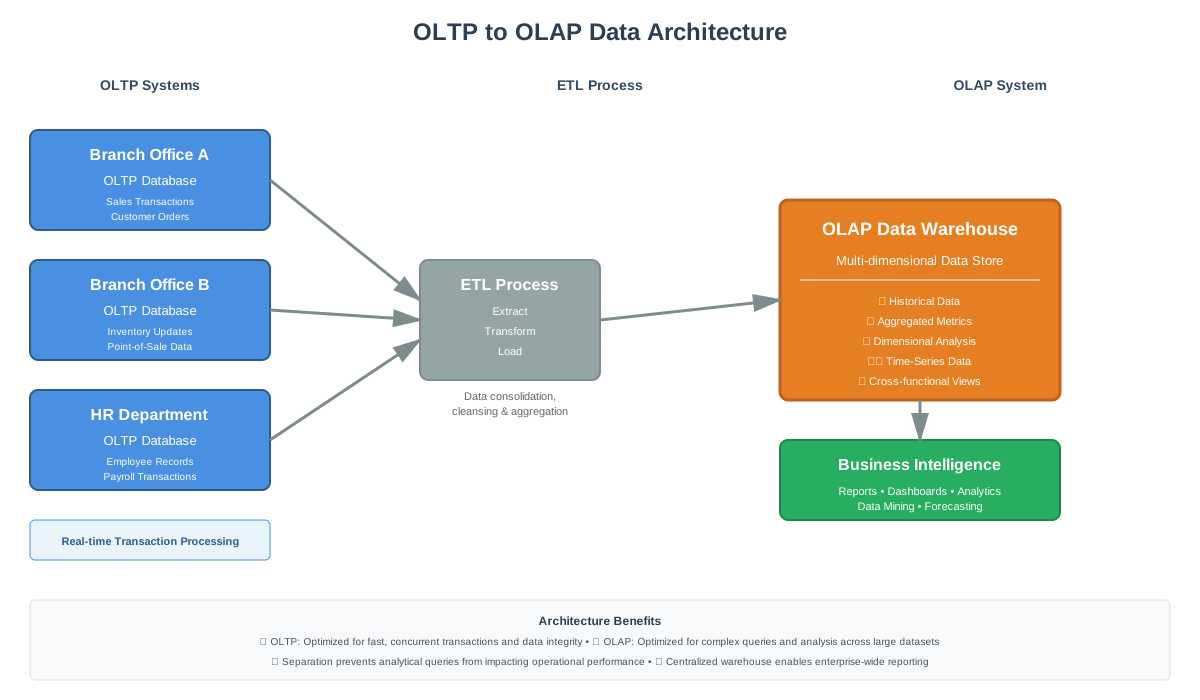
Though OLAP and OLTP are both vital in a data-driven organization, they serve very different purposes. Here are the key differences between OLTP and OLAP systems and what those differences mean for data:
-
Primary Purpose
OLTP systems exist to manage and record transactions as they happen – they are operational. In contrast, OLAP systems exist to analyze data – they are informational. OLTP provides an immediate record of current business activity (e.g. recording a sale or update), whereas OLAP generates insights from aggregated historical data over time. In other words, OLTP controls and runs essential daily operations in real time, while OLAP supports planning, analysis, and decision-making by looking at trends and patterns in the data.
-
Data Volume & History
OLTP typically deals with current, fine-grained data and keeps only what's needed for ongoing operations. These databases are usually smaller in size (gigabytes, as older data might be archived or purged) and optimized for quick updates. OLAP, on the other hand, works with historical and aggregated data, often pulling from many periods and sources. OLAP databases tend to be much larger (terabytes or more) since they accumulate years of information for analysis. This historical depth allows OLAP to identify long-term trends, but it also means OLAP data stores require significantly more storage and computational power.
-
Data Model
OLTP databases are usually highly normalized (3rd normal form or similar), which minimizes redundancy and ensures consistency for transactional updates. OLAP databases, conversely, use denormalized, multi-dimensional schemas (like star or snowflake schemas) to optimize read performance. OLAP data models often include pre-aggregated facts and are structured as cubes or wide tables. The denormalization means an OLAP query can get all needed data with fewer joins (faster for analytics), at the expense of some data redundancy.
-
Query Characteristics
OLTP workloads consist of a large number of simple, short queries and transactions — often basic INSERT, UPDATE, or SELECT statements affecting only a handful of records. OLAP workloads consist of fewer but far more complex queries — an OLAP query might scan millions of records (e.g., summing up a year's sales across all stores) and perform aggregations and multi-table joins. OLTP is optimized for simple, atomic queries with sub-second responses, while OLAP is optimized for complex analytical queries that tolerate longer execution time in exchange for depth of insight.
-
Performance and Throughput
In OLTP, every millisecond counts — systems are optimized for low latency and high throughput of transactions. OLAP prioritizes throughput over latency — it's about how much data can be processed to answer a question, not how quickly a single record is written. Batch processing is common in OLAP (e.g., nightly ETL to load the latest data into the warehouse) since immediate consistency isn't critical for analysis.
-
Users and Accessibility
OLTP systems are used by frontline employees and applications — cashiers, bank tellers, customers on a website. These users care only about the success of their individual transaction. OLAP systems are used by analysts, managers, and knowledge workers looking at the bigger picture — quarterly trends, segment performance, forecasts.
-
Data Integrity and Backups
Because OLTP systems are constantly changing data, they require continuous backups and robust recovery mechanisms. Any OLTP downtime directly disrupts business operations. OLAP systems often deal with read-only copies of data sourced from OLTP — if an OLAP issue occurs, data can be reloaded from source. Problems in OLAP affect analysis accuracy but won't stop operational processes.
In essence, OLTP and OLAP differ in almost every aspect: one is the operational workhorse, the other is the analytical brain.
OLAP vs OLTP Examples
Concrete examples make the distinction clearer. Here's how both systems appear in real business scenarios:
OLTP examples
- E-commerce checkout: When a customer places an order, the OLTP database records the transaction, updates inventory, charges the payment method, and sends a confirmation — all within milliseconds, while hundreds of other customers do the same simultaneously.
- ATM withdrawal: The bank's OLTP system verifies your balance, debits the amount, records the transaction, and updates your account in real time. ACID compliance ensures no money is debited without a corresponding record.
- Airline booking: When you book a seat, the OLTP system locks that specific seat, records the reservation, and prevents anyone else from booking it — a classic example of concurrency control in action.
- SaaS application database: When a user in a project management tool creates a task, assigns it, or marks it complete, those writes hit an OLTP database (typically PostgreSQL or MySQL) designed for fast, reliable individual record updates.
OLAP examples
- Retail sales analysis: A merchandising team queries their data warehouse to find which product categories had the highest margin by region last quarter, broken down by store format. The query scans millions of transaction records aggregated from the OLTP system.
- Financial forecasting: A finance team uses an OLAP tool to model next year's revenue across business units, pulling two years of historical actuals from the warehouse to inform the projection.
- Customer cohort analysis: A growth team runs queries on their OLAP database to understand how revenue retention differs across customer cohorts, comparing customers acquired in different quarters over 18 months.
- Marketing attribution: An analyst uses BigQuery to aggregate ad spend, click data, and conversion events across channels to calculate cost per acquisition by campaign — a query that touches hundreds of millions of rows but returns in seconds thanks to OLAP's columnar storage.
The pattern is consistent: OLTP handles the individual event as it happens; OLAP handles the analysis of thousands or millions of those events after the fact.
OLAP Workloads vs OLTP Workloads
Understanding the workload type helps you choose the right system — or diagnose why a system is struggling.
OLTP workloads are characterised by:
- High frequency of short read/write operations (thousands to millions per second)
- Transactions that touch a small number of rows at a time
- Queries that use indexes heavily to find specific records quickly
- Heavy INSERT, UPDATE, and DELETE activity
- Many concurrent users writing and reading simultaneously
OLAP workloads are characterised by:
- Lower frequency of queries, but each query scans large amounts of data
- Mostly read-only operations — few or no writes during analysis
- Aggregations, GROUP BY, window functions, and joins across large tables
- Columnar storage and parallel processing to handle full-table scans efficiently
- Batch data loads (typically via ETL/ELT pipelines) rather than real-time writes
The reason you can't simply run OLAP workloads on an OLTP database is that OLTP databases are row-oriented — optimised to retrieve and update individual rows quickly. Running a query that needs to scan and aggregate millions of rows requires reading entire rows even when you only care about two or three columns. OLAP databases use columnar storage, which reads only the columns needed for a query — dramatically faster for analytical work.
OLAP vs OLTP in Data Warehouse Context
A data warehouse is inherently an OLAP system. Its entire purpose is to store historical data from multiple operational (OLTP) sources in a format optimised for analytical queries.
The typical flow looks like this:
OLTP systems (your application databases, CRM, billing system) capture transactions as they happen → ETL/ELT pipeline extracts that data and loads it into the data warehouse → OLAP queries run against the warehouse for reporting and analysis.
This is why the question "OLAP vs OLTP in data warehouse" is slightly inverted — a data warehouse is the OLAP layer. You don't choose between them in a warehouse context; the warehouse is where OLTP data goes to become queryable for OLAP purposes.
In data mining, OLAP plays the same role: data mining algorithms and exploratory analysis operate on the aggregated, historical data in OLAP systems, not on live OLTP databases where running heavy queries would compete with production traffic.
Specific Database Comparisons
A common source of confusion is where specific, well-known databases fall on the OLAP/OLTP spectrum.
Is MySQL OLTP or OLAP?
MySQL is an OLTP database. It's a row-oriented relational database optimised for fast transactional reads and writes, with strong ACID compliance and concurrency control. It's the database behind most web applications, e-commerce platforms, and SaaS products that need reliable, fast individual record operations.
MySQL can run analytical queries, but it struggles with large-scale aggregations. Running OLAP-style workloads on MySQL — like scanning millions of rows to compute year-over-year revenue — will be slow and will compete with production traffic. For that kind of analysis, MySQL data is typically replicated or exported to a data warehouse.
Is Snowflake OLAP or OLTP?
Snowflake is an OLAP system — specifically, a cloud data warehouse built for analytical workloads. Its architecture uses columnar storage, separates compute from storage, and is designed to run complex queries across massive datasets efficiently.
Snowflake is not designed for the high-frequency, low-latency writes that OLTP requires. You wouldn't use Snowflake as the database for a live application where users are constantly reading and writing individual records. Its strength is in analytical queries: aggregations, historical analysis, complex joins across large tables.
Is Redshift OLAP or OLTP?
Amazon Redshift is an OLAP system — a columnar data warehouse optimised for analytical queries at scale. Like Snowflake, it's designed to process large volumes of data for business intelligence and reporting, not to handle the real-time transactional writes of an application database.
Redshift uses columnar storage, parallel query execution, and compression to make large analytical queries fast. It's not a replacement for PostgreSQL or MySQL in an application stack — it's where data from those systems goes to be analysed.
Oracle: OLTP or OLAP?
Oracle Database can handle both, which is part of why it's been so widely adopted in enterprise environments. Oracle is primarily an OLTP database, with strong transactional capabilities, ACID compliance, and concurrency control. But Oracle also offers analytical extensions (like Oracle OLAP and its in-memory column store) that let it serve analytical workloads without offloading to a separate warehouse — a common pattern in enterprise finance systems. That said, most modern architectures still separate the OLTP and OLAP concerns across different systems.
OLAP vs OLTP vs ODS
A third system type comes up in enterprise data architectures: the ODS (Operational Data Store). It's worth understanding how it fits alongside OLAP and OLTP.
| OLTP | ODS | OLAP | |
|---|---|---|---|
| Purpose | Record transactions in real time | Integrate current operational data from multiple sources | Analyze historical data for BI and reporting |
| Data freshness | Real-time | Near real-time (minutes/hours) | Batch-updated (daily/weekly) |
| Data scope | Single application/domain | Integrated across systems, current data only | Historical, aggregated, multi-year |
| Query type | Short transactional reads/writes | Operational reporting, current-state queries | Complex analytical queries |
| Typical use | Application database | Operational dashboards, cross-system lookups | Data warehouse, BI tools |
The ODS sits between OLTP and OLAP in the data flow. It aggregates current data from multiple OLTP systems into a single integrated view — useful for operational reporting that needs data from more than one system but doesn't require years of history. Data then flows from the ODS (or directly from OLTP systems) into the OLAP data warehouse for historical analysis.
In practice, not every organization uses an ODS — many go directly from OLTP to OLAP via ELT pipelines. But in complex enterprise environments with dozens of operational systems, an ODS provides a cleaner integration layer.
OLAP Advantages and Disadvantages
Advantages of OLAP
- Fast analytical queries on large datasets thanks to columnar storage and pre-aggregation
- Multi-dimensional analysis — easily slice data by any combination of dimensions (time, region, product, segment)
- Historical depth — designed to retain and query years of data that OLTP systems would archive or delete
- Separation of analytical load from operational systems — running reports in OLAP doesn't slow down your live application
- Scales well for read-heavy analytical workloads; modern cloud OLAP systems (Snowflake, BigQuery, Redshift) scale compute independently of storage
Disadvantages of OLAP
- Not suited for real-time writes — OLAP databases are updated in batches, so data is never fully up to the minute
- Higher latency for data freshness — depending on your pipeline, there's always some lag between an event happening in OLTP and it being queryable in OLAP (minutes to hours in modern streaming setups; up to 24 hours in nightly batch pipelines)
- Complexity and cost — maintaining a data warehouse with ETL/ELT pipelines, schema management, and access controls adds architectural complexity and cost
- Not a replacement for OLTP — OLAP cannot serve as your application database; it's always downstream of operational systems
From OLTP to OLAP: How Data Flows Between Systems
Understanding how data moves from your OLTP systems to your OLAP layer is key to building a reliable analytics architecture.
The process typically works like this:
1. Data is captured in OLTP systems — your application database, CRM, billing platform, event tracking — as individual transactional records.
2. An ETL or ELT pipeline extracts that data on a schedule (nightly batch) or continuously (streaming/CDC — Change Data Capture) and loads it into the data warehouse.
3. The data warehouse (OLAP layer) transforms and models the data — cleaning it, joining tables, computing derived metrics, and structuring it for analytical queries.
4. BI tools and analysts query the warehouse for reports, dashboards, and ad-hoc analysis.
The key design principle is that OLAP never writes back to OLTP — data flows one way. Your analytical systems are always downstream of your operational ones. This separation protects production performance and keeps your source-of-truth transactional data clean.
When to Use OLAP
Use OLAP whenever an organization needs to derive insights from data beyond simple reporting:
- Historical trend analysis and reporting: Year-over-year comparisons, quarterly financial reporting, customer behavior over time — anything that requires aggregating data across long time horizons.
- Multi-dimensional analysis for business intelligence: Slicing data by regions, products, customer segments, and time frames simultaneously. Business intelligence dashboards and data warehouse platforms rely on OLAP for exactly this.
- Data mining and advanced analytics: OLAP is the foundation for predictive analytics and machine learning in cases where those processes need summarized or historical data.
OLAP is not the right choice for handling real-time transactions, very rapid updates to individual records, or small-scale simple data tasks where the architectural overhead isn't justified.
When to Use OLTP
Use OLTP whenever you need to process transactions reliably and quickly as part of day-to-day operations:
- High-velocity transaction environments: Order entry, payment processing, inventory updates, reservations, authentication — any system that handles many concurrent, short transactions.
- Operational databases for business processes: Banking transactions, travel bookings, point-of-sale systems, telecom billing — scenarios where every transaction must be correctly captured and the system must be highly available.
- Multi-user, interactive applications: CRM systems, social platforms, SaaS applications where many users read and write data simultaneously and expect immediate, accurate responses.
OLTP is not suitable for heavy analytical queries that scan large portions of the database. If your operational database is straining under reporting queries, that's the signal you need an OLAP layer.
Conclusion
Ultimately, the distinction between OLAP and OLTP comes down to their specific roles in the lifecycle of data.
OLTP systems are the engines of the "now." They are the operational backbone, essential for capturing business reality as it happens — ensuring that inventory is deducted, payments are processed, and user actions are recorded with millisecond precision and absolute integrity.
OLAP systems are the engines of the "why" and "what next." They take that captured reality, aggregate it, and provide the historical context needed to make data-driven decisions, spot market trends, and forecast future performance.
For any modern organization, this is not an "either/or" choice, but rather an architectural partnership.
A robust data strategy relies on a symbiotic relationship where:
- OLTP handles the high-velocity intake of raw transactions.
- OLAP delivers the deep analytical insights required for intelligence.
- The pipeline between them (ETL/ELT) keeps both in sync.
By understanding that OLTP manages the business while OLAP guides the business, you can design a data ecosystem that ensures operational stability without sacrificing analytical depth.
Additional Resources
- Best ETL Pipeline Tools: Compare the Best 5 ETL pipeline tools of 2025 on ease of use, scalability, integrations, and cost to find the best data integration solution.
Frequently Asked Questions (FAQs)
What is OLAP?
OLAP (Online Analytical Processing) is designed for fast multi-dimensional data analysis, aggregating historical data in warehouses or cubes for complex business intelligence queries like trend analysis and forecasting.
What is OLTP?
OLTP (Online Transaction Processing) manages real-time transactional data using relational databases, handling high volumes of short transactions with ACID properties for applications like banking and e-commerce.
What is the key difference between OLAP and OLTP?
OLTP handles real-time transactional operations for immediate data consistency, while OLAP performs complex analytical queries on historical data for business intelligence and decision-making. OLTP is optimized for writes; OLAP is optimized for reads across large datasets.
Which database should be used for OLAP and OLTP?
OLTP uses traditional RDBMS like Oracle, MySQL, or PostgreSQL for transactions. OLAP uses specialized data warehouses like Amazon Redshift, Snowflake, or Google BigQuery for analytical queries.
Is MySQL OLTP or OLAP?
MySQL is an OLTP database. It's row-oriented, optimized for fast transactional reads and writes, and not well-suited for large-scale analytical aggregations. For analysis, MySQL data is typically exported to a data warehouse like Snowflake or BigQuery.
Is Snowflake OLAP or OLTP?
Snowflake is an OLAP system — a cloud data warehouse built for analytical workloads. It uses columnar storage and is designed for complex queries across large datasets. It is not designed for the high-frequency, low-latency transactional writes that OLTP requires.
Is Redshift OLAP or OLTP?
Amazon Redshift is an OLAP system — a columnar data warehouse optimized for analytical queries at scale. Like Snowflake, it's where data from OLTP systems flows to be analyzed, not a database for live application transactions.
What is an ODS and how does it differ from OLAP and OLTP?
An ODS (Operational Data Store) sits between OLTP and OLAP. It integrates current data from multiple OLTP sources into a single view for operational reporting, but unlike OLAP it doesn't retain long historical data or support complex multi-dimensional analysis. Data flows from OLTP → ODS → OLAP in architectures that use all three.
What is OLAP and OLTP full form?
OLAP stands for Online Analytical Processing. OLTP stands for Online Transaction Processing. The 'online' in both refers to real-time processing over a network, as opposed to older batch-processing systems.
About the author

Co-Founder, Daymark
Karan is a co-founder of Daymark, where he builds the connections between Shopify, ad platforms, and warehouses that turn scattered store data into one source of profit truth. He writes about Shopify analytics, data integration, and using AI to query store data without SQL.
LinkedIn